My Timber Pets Controls
Move, look, assign, spend. You should not be clicking every log.
My Timber Pets is a Roblox idle tycoon. The control scheme is standard Roblox movement plus a HUD of shops, rolls, and assignment buttons. If you are still tapping a tree every second after the tutorial, something is unassigned. This page is the input map. Pair it with Getting Started on day one and how to play once the island is chopping.
There is no separate combat layer, no blocking, and no skill bar. Voice chat is listed as not supported. Camera accessories are not supported. You walk around a hexagonal island, open menus, and leave animals to work.
Keyboard and mouse
| Action | Input |
|---|---|
| Move | WASD or arrow keys |
| Jump | Space |
| Camera | Right mouse drag, or trackpad look |
| Zoom | Mouse wheel (Roblox default) |
| Interact / confirm | Left click on a tree, pad, NPC, or HUD button |
| Chat | Slash / if the experience allows it |
| Shift lock | Roblox setting, optional |
You do not need a custom keybind profile. If click does nothing, you are probably still inside a tutorial overlay, standing on water after a fall, or looking at someone else’s island in a six-player server. Reset character from the Roblox menu, then walk back onto your hex.
Mobile and tablet
| Action | Input |
|---|---|
| Move | On-screen thumbstick |
| Jump | Jump button |
| Camera | Drag with a second finger |
| Interact | Tap the tree, pad, or button |
| HUD | Tap icons on the left or top edge |
Landscape mode makes the gift, shop, and roll icons easier to hit. Auto-correct will wreck code pastes; disable it when the redeem box is open. See how to redeem for the paste path.
If the thumbstick covers a pad on a new floor, rotate the camera so the pad is in the open third of the screen, then tap. Do not buy a floor you cannot tap on a phone. Graphics down if ladders stutter.
Console
Xbox and PlayStation use the Roblox virtual cursor. Move with the left stick, look with the right, confirm with the face button that maps to click. Text fields (codes) open the on-screen keyboard. Type slowly. Analog typos are the main reason console redeems fail.
What you actually click in this game
Idle means animals chop. Your clicks should be rare:
- Assign. Collection or crew menu → put an animal on a tree. An animal in the index is not working. Best crew says which body goes on which pad.
- Shop. Forest, crew, or floor lines. One purchase per decision, then watch the
/scounter. See the upgrades ranking. - Roll. Red button / pedestal in official art. Short bursts only. Rare animals and traits cover keep rules.
- Codes. Gift, shop, or settings icon. Empty as of 1 Sep 2026.
- Climb. Ladders between hexagonal stories. Camera-orbit if you cannot find the rung.
You should not be holding click on a cube tree after the Tutorial Completed badge. If you are, the starter chicken is not assigned.
Camera tips on a stacked island
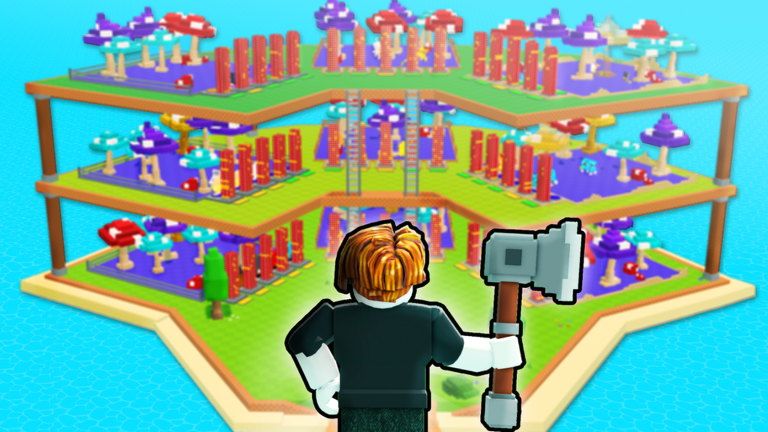
Official art shows three stories with mushroom trees. The camera clips through posts if you stand too close. Back up to the water ring, then tilt down. Shift lock can help on desktop when assigning a pad on floor two.
Falling off dumps you in the water. Swim or reset. Animals should keep chopping; you only wasted a minute. That is why AFK farm wants assignments done before you walk the ladder for screenshots.
HUD icons you should tap once
On the first session, tap every edge icon so you know which one is cosmetics:
- Currency (logs) — read-only unless a collect button exists.
- Upgrade shop — forest / floors / crew.
- Collection — animals and maybe traits.
- Roll / luck.
- Gift or Twitter-style codes.
- Settings / music / rejoin.
If a button opens Robux packs, close it on day one. The listing is free-to-play.
Accessibility and performance
- Lower graphics before stacking floors. Extra mushroom trees add parts.
- Reduce motion in Roblox settings if orbs on this wiki bother you; that is separate from in-game camera shake.
- Color of the TRAIT banner on the game icon is high contrast on purpose. Tooltips still need to be read; do not guess a trait from the model color alone.
- Six-player servers can hitch at peak. Rejoin from the official place if input feels buffered.
Controls will not fix a bad island
Perfect WASD does not raise 1/s to 45Q/s. Trees, crew, and floors do. If you came here because chopping feels manual, assign the chicken, then leave. The progress checklist is the post-controls loop. If you came here from a script video promising auto-click, read script safety instead of binding a macro to left click.
When the inputs are boring, you are playing My Timber Pets correctly.
Frequently Asked Questions
Quick answers for My Timber Pets on Roblox.
Do I need to click every tree?
No. After the tutorial, animals chop. If you are still clicking, assign a crew member using Getting Started.
Where is the codes button?
Usually a gift, shop, or settings icon. Exact label was not in official art as of 1 Sep 2026. See how to redeem.
Can I rematch keys?
Use Roblox defaults. This tycoon does not need a fighting-game bind set.
Why can I not tap a pad on mobile?
The thumbstick is covering it, or the new floor is off-screen. Rotate the camera and try again.